A digital entitlement (also called Digital License) activates Windows without a product key: Microsoft stores a record matched to the PC's hardware fingerprint (HWID). After going online the OS consults those servers and activates with no input from you.
Windows activation with a digital licence
Once online, Windows compares the device's hardware ID (HWID) with Microsoft's licence records and activates by itself - there is nothing to type. It only works if Windows was activated on this PC before, for instance on an OEM laptop or after a paid upgrade.
No licence and no plans to buy one?
A digital licence will not help then. A free route through an activator exists.
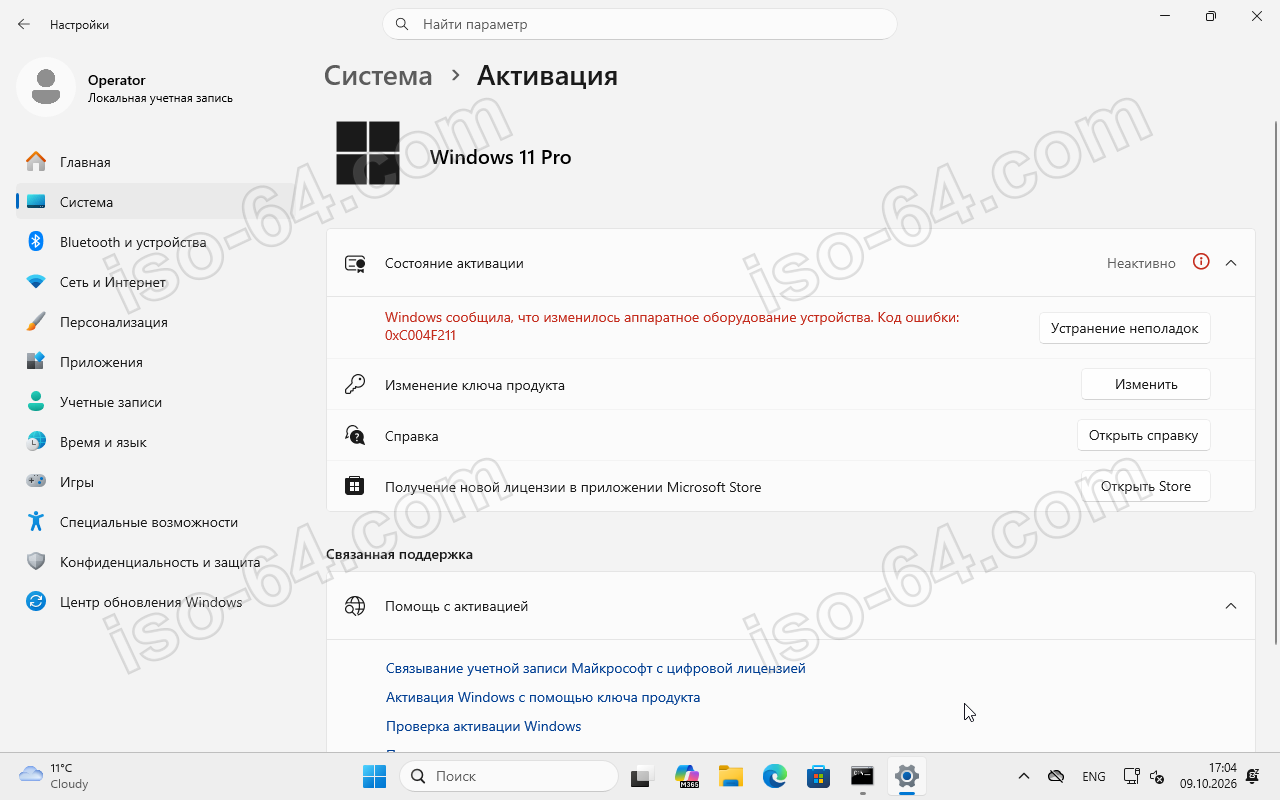
Open Settings with Win + I. The page lives under System on Windows 11 and under Update & Security on Windows 10 - both called «Activation». Our Windows 11 screenshot reads Not active, code 0xC004F211.
Lab Windows 11 Pro, Activation page: Not active, code 0xC004F211. No genuine entitlement was present.
2
A line stating the system «is activated with a digital license» means the entitlement matches this hardware and nothing needs fixing
3
When that wording also names your Microsoft account, the entitlement is attached to the profile. That attachment unlocks recovery after part replacements, yet some licence types still cannot travel. Our lab never showed this wording.
Attach the entitlement to your Microsoft profile
Recommended
Handle this early, while the original parts are still installed. After a board replacement the attachment can no longer be created.
1
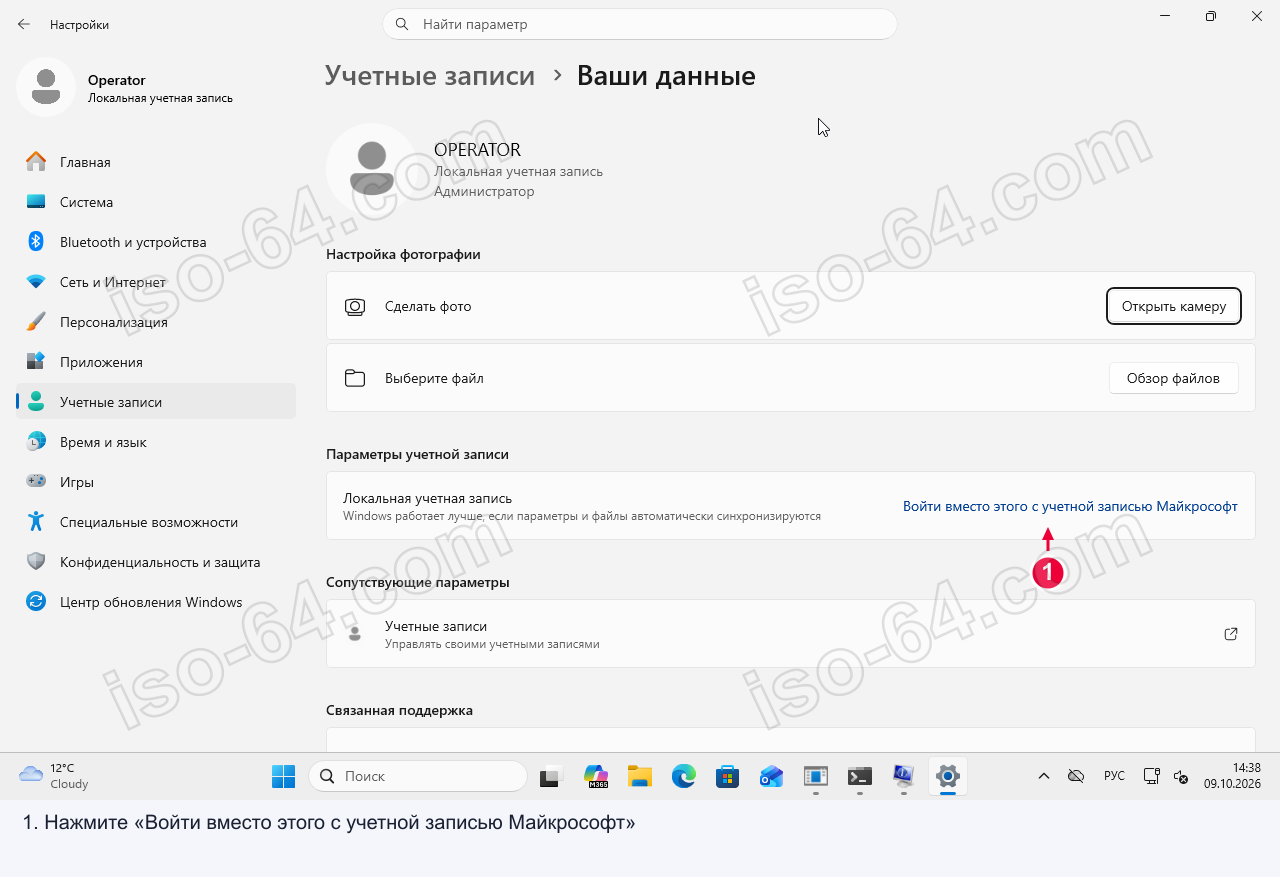
Windows 11 keeps the option in «Accounts → Your info»: a link offers to «Sign in with a Microsoft account instead». Our frame shows a local user; we did not go through with it.
Second Windows 11 sample on Your info: still a local profile, with the switch-to-Microsoft link visible. Not used, and the build behind this frame was not checked.
2
Then go back to Activation by the route from step one for your version and re-read the state. We skipped a repeat screenshot.
3
Seeing your Microsoft profile mentioned on that page means the job is finished. If it is absent, use «Add an account» and log in.
Reactivation after a hardware change via the troubleshooter
Our Windows 11 frame displays 0xC004F211 once the VM's virtual parts were modified. A troubleshooter run or an attached profile cannot stand in for a real entitlement, and neither promises a result.
1
Log in as an administrator using the Microsoft account that the entitlement was attached to earlier
2
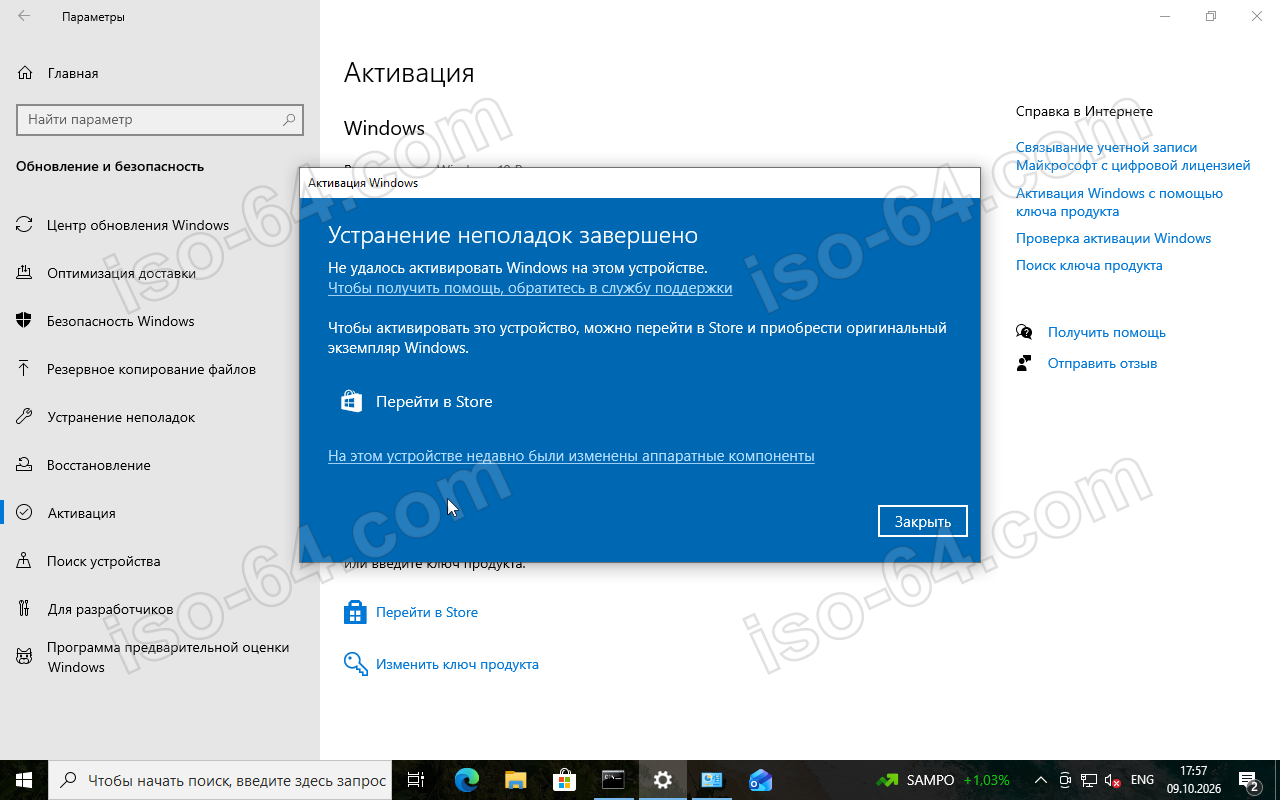
While Windows is unactivated, the Activation page carries a «Troubleshoot» button - press it. Further down: a Windows 10 attempt that ran to the end without activating.
Windows 10 attempt: «Troubleshooting is complete», followed by «We can't activate Windows on this device». Expected when no genuine entitlement exists - not a success.
3
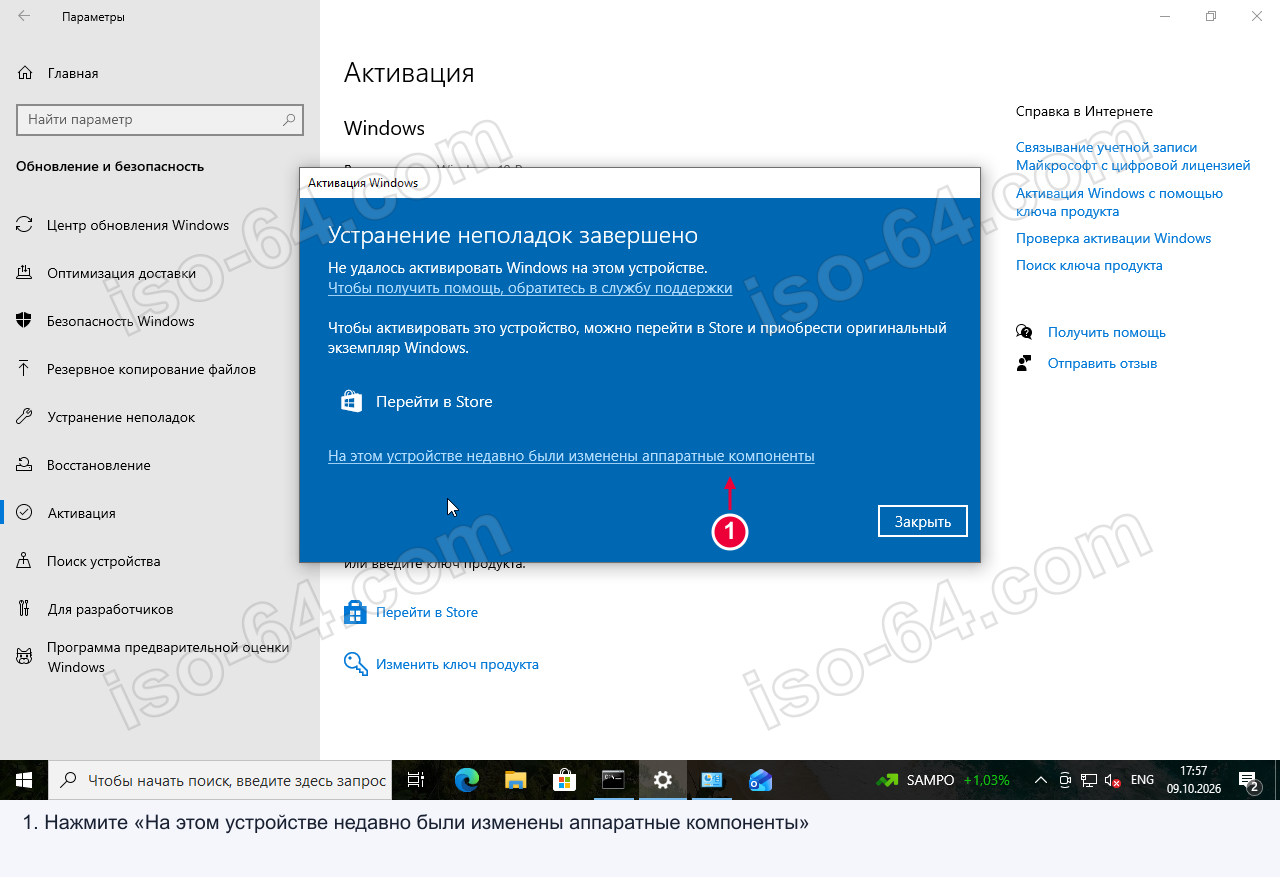
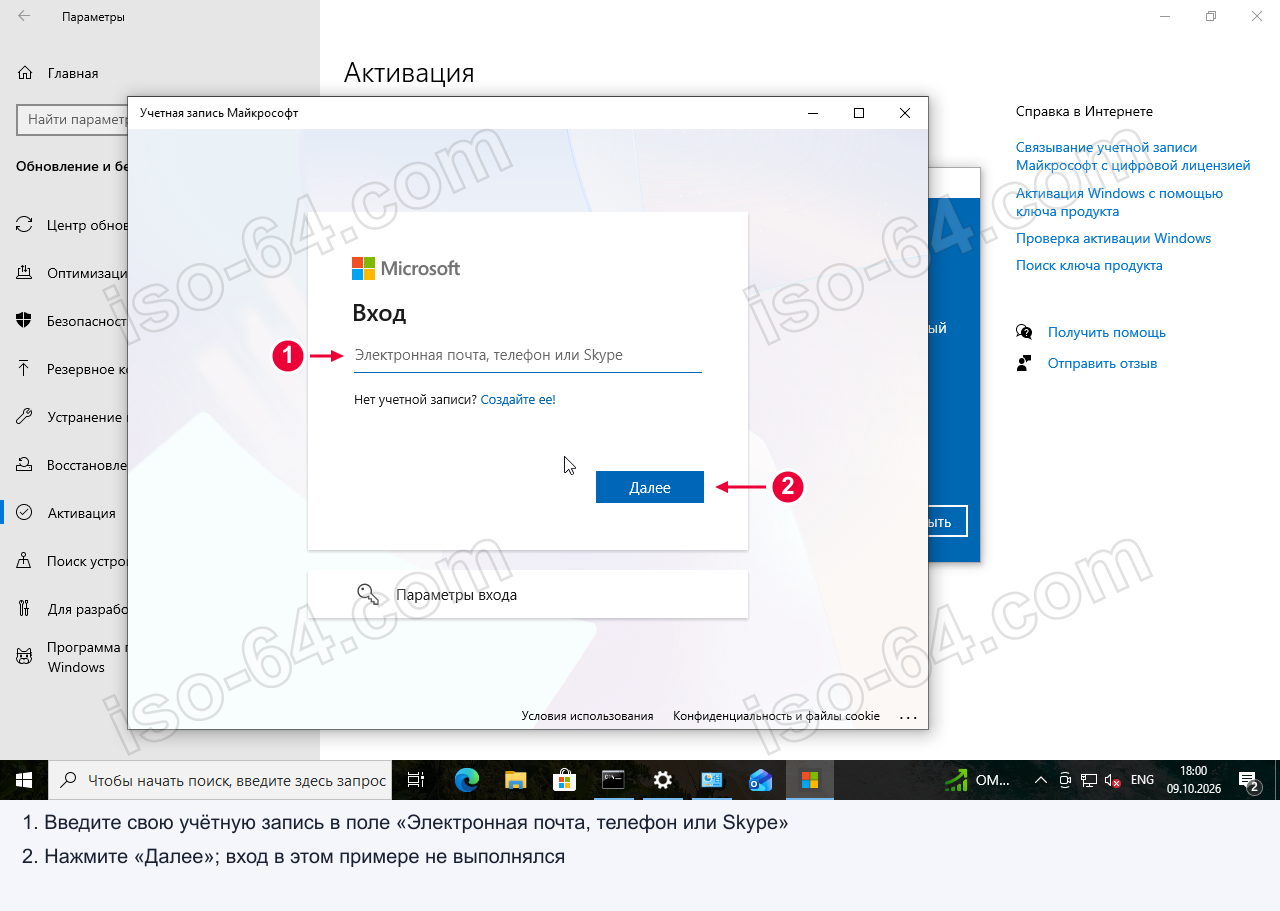
Pick the option saying «I changed hardware on this device recently». A login prompt appears; enter the profile that owns the entitlement under «Email, phone, or Skype» and continue with «Next». We stopped before logging in.
Windows 10 again, after clicking that option. A Microsoft login follows; we did not recover anything.The resulting prompt: one field for email/phone/Skype plus Next. We neither logged in nor chose a device from the list.
4
From the list of your devices choose this PC and tick «This is the device I'm using right now»
5
Finish with «Activate», then read the outcome. Whether it works depends on a genuine entitlement, matching edition and transfer terms; we could not confirm it.
Two scenarios - which one is yours
1
HWID only - no account
For factory-licensed laptops and desktops that ran activated Windows on these exact parts. After connecting, the system reads its fingerprint, asks Microsoft for a match and finishes quietly - no key entry, no profile login. Expect a few minutes.
Automatic once online
2
Through a Microsoft account
Required when the board or processor was replaced, or the system now runs on different parts - the fingerprint no longer matches, so Microsoft cannot pair it unaided. Log in with the profile you attached earlier and start the troubleshooter from Activation. If nothing was attached beforehand, this path leads nowhere.
After part swaps or on another computer
How activation works under the hood
1
Computing the HWID
Windows gathers hardware traits - motherboard, CPU, TPM chip and several other parts - and derives a hash from them. That hash is the device's unique identifier.
2
Storing it on Microsoft's servers
Microsoft records that hash at the first successful activation and pairs it with one edition, such as Home or Pro. Fitting more memory, a different GPU or another SSD does not alter the fingerprint, so you stay activated.
3
Automatic check during setup
Each time Windows is reinstalled on the same hardware, it contacts the servers, compares the HWID and activates without a key. When a match is found, activation completes within minutes of going online.
4
Attaching a Microsoft profile - a safety net
Optionally, attach the entitlement to your Microsoft profile. Nothing forces you to, yet it pays off later: should parts change - a new board, for example - logging in lets the troubleshooter bring activation back.
Where a digital licence comes from
A digital licence appears on its own under any of the following conditions - no extra steps required.
OEM laptop or PC with Windows preinstalled
The manufacturer writes the licence into firmware at the factory. Reinstalling the same edition activates automatically.
Free upgrade from Windows 10 → 11
Moving to Windows 11 on supported parts creates a fresh Windows 11 entitlement tied to that machine.
Buying the OS in the Microsoft Store
A retail licence is tied to the Microsoft account and can move to another device.
Windows Insider participation
Valid on a machine that was activated beforehand; leaving the preview builds does not remove it.
The free 7/8.1 → 10 offer ended back in 2016.
OEM versus Retail - how the licences differ
Which kind you own decides what happens after part replacements or migrating to a different computer.
Aspect
OEM
Retail
Bound to
Specific hardware, permanently
Microsoft account, transferable
Motherboard swap
Activation lost for good
Troubleshooter restores it
Move to another PC
Not possible
Possible, after deactivating the old one
Price
Cheaper, bundled with the PC
Pricier (~$100+), sold separately
On laptops
Almost always OEM
Rarely seen
Common problems and fixes
No profile attachment existed before the board was replaced
Forums report this more than anything. Here the troubleshooter is powerless: an OEM entitlement cannot come back after a board swap unless it was attached earlier. Microsoft support is the last resort, and success is far from certain. Attach the entitlement while you still can.
Windows edition mismatch
Microsoft holds a Pro entitlement but you put Home on the disk - activation fails despite an identical fingerprint. Determine the edition that was activated originally and reinstall that one.
Trouble reaching activation servers from Russia
From 2022 onward a portion of users located in Russia report stuck or failing activation requests. Workarounds: start the troubleshooter while connected through a VPN, or reach Microsoft by chat at support.microsoft.com.
A BIOS update or boot mode change reset activation
Flashing firmware on the board or toggling UEFI ↔ Legacy alters part of the fingerprint. Microsoft may read that as different parts and drop activation. With a profile attachment in place, the troubleshooter fixes it.
«Activated» ≠ a genuine licence on the servers
Certain bypass tools also print the digital-license wording although Microsoft keeps no real record for the device. Proof comes only from the troubleshooter: a server-side confirmation means it is genuine.
Licences are not shown in your Microsoft account dashboard
The Microsoft account website deliberately lacks any list of attached Windows entitlements. You can only see the state inside the OS, on Settings → System → Activation.
Windows 7 and 8.1 keys stopped working in 2023
Microsoft shut that loophole in September 2023. Legacy keys entered on 10 or 11 now fail with 0x803FA067 or 0xC004F050, whichever version you run.
Other activation methods
If a digital licence is not your case, pick another method.
Comments: 0